A notebook of useful things

Author: Ivan Debono (Page 1 of 9)

The multiplication of embarrassment

Multiply two integers without using the multiplication operator.”

A few months ago I had a technical interview for a data science consulting firm. I was only asked one question, and it seemed so outlandishly removed from the job role that I wondered whether the interviewers had mistaken me for a candidate for another vacancy.

It was simply this:

“Write a function that multiplies two integers (positive or negative) without using the multiplication operator.”

The interviewers said they were fine with pseudocode.

I was sharing my screen on one of those snazzy online coding platforms. Within seconds, they said they wanted working code.

I chose to use Python – it was in the job requirements after all – and promptly wrote the most obvious code imaginable.

def multiply_by_summation(a, b):
    result = 0
    for _ in range(abs(b)):
        result += a
    return -result if b < 0 else result

They asked whether I could optimise this, so I added a line to find the smaller of the two absolute values of a and b, and loop over the smaller one. I was asked to make it faster than O(|b|).

Then they seemed to get tired of the whole thing, and that was that.

I didn’t get the job.

The classic interview answer is of course so-called Russian peasant multiplication. It is huge misnomer. The method was used in Ancient Egypt, and why Russian peasant? Because of Vladimir Golenischev?

Anyway, here it is. The method relies on successive halving and doubling. It runs in O(log b) time.

def multiply_egyptian(a, b):
    if a == 0 or b == 0:
        return 0
    # Make a positive, remember sign
    negative = (a < 0) ^ (b < 0)
    a, b = abs(a), abs(b)
    
    result = 0
    while b > 0:
        if b & 1:           # if b is odd
            result += a
        a <<= 1             # a = a * 2
        b >>= 1             # b = b // 2
    return -result if negative else result

An even faster algorithm is Karatsuba multiplication, which should rightfully be called Russian multiplicaiton, since it was invented by the Russian Anatoly Karatsuba. This has a time complexity of O(n1.58n ), where n is the number of digits.

def add_n_times(base, times):
    """Add 'base' to itself 'times' times: base * times without '*'."""
    result = 0
    for _ in range(times):
        result += base
    return result

def pow10(n):
    """Compute 10**n using only addition (no '*', no '**')."""
    if n == 0:
        return 1
    # Build iteratively: pow10(n) = pow10(n-1) * 10 = add pow10(n-1) ten times
    result = 1
    for _ in range(n):
        result = add_n_times(result, 10)  # result * 10
    return result

def multiply_bit_only(a, b):
    """O(log n) multiplication using only bits/addition (for base case)."""
    if a == 0 or b == 0:
        return 0
    negative = (a < 0) != (b < 0)
    a, b = abs(a), abs(b)
    result = 0
    while b > 0:
        if b & 1:
            result += a
        a <<= 1  # a *= 2 (bit shift allowed, as it's not '*')
        b >>= 1  # b //= 2
    return -result if negative else result

def karatsuba_no_multiply(x, y):
    """Full Karatsuba without any '*': recursive, O(n^1.58) asymptotically."""
    # Base case: small numbers use bit multiplication
    if abs(x) < 10 or abs(y) < 10:
        return multiply_bit_only(x, y)
    
    # Handle signs
    negative = (x < 0) != (y < 0)
    x, y = abs(x), abs(y)
    if x < y:
        x, y = y, x
    
    # Digits in smaller number
    n = len(str(y))
    half = (n + 1) // 2  # Ceiling of n/2
    
    # Split using div/mod 
    divider = pow10(half)
    x_high = x // divider
    x_low = x % divider
    y_high = y // divider
    y_low = y % divider
    
    # 3 recursions instead of 4
    z0 = karatsuba_no_multiply(x_low, y_low)
    z2 = karatsuba_no_multiply(x_high, y_high)
    z1 = karatsuba_no_multiply(x_low + x_high, y_low + y_high) - z2 - z0
    
    # Combine without '*': use add_n_times for the "shifts" (powers of 10)
    pow_half = divider  # Already 10**half
    pow_double = add_n_times(pow_half, pow_half)  #
    
    double_half = add_n_times(half, 2)
    pow_double = pow10(double_half)
    
    # Now "z2 * pow_double" = add z2, pow_double times
    part_high = add_n_times(z2, pow_double)
    # "z1 * pow_half" = add z1, pow_half times
    part_mid = add_n_times(z1, pow_half)
    
    # Total: part_high + part_mid + z0
    result = part_high + part_mid + z0
    return -result if negative else result

Perplexity

You may have seen the term perplexity in (countless) NLP papers and code. What is it exactly?

A bit of history

Perplexity as a metric rooted in information theory was first introduced in 1977 in the context of speech recognition by a team of IBM researchers: Frederick Jelinek, Robert L. Mercer, Lalit R. Bahl, and James K. Baker.

Perplexity — a measure of the difficulty of speech recognition tasks (JASA, 1977)

This pioneering work quantified the “difficulty” or uncertainty in probabilistic models for predicting acoustic/linguistic sequences.

The same group (Bahl, Jelinek, Mercer) continued using it, notably in their 1983 paper A maximum likelihood approach to continuous speech recognition (IEEE Trans. Pattern Anal. Mach. Intell, 1983).

It was later adapted and popularised in natural language processing through the 1990 paper
Peter F. Brown et al., “A Statistical Approach to Machine Translation” (Computational Linguistics, 1990). By this time – and these were the early days of NLP – perplexity became the standard intrinsic evaluation metric for n-gram language models. This lives on in modern LLMs, vulgarly known as PPL. Words with more than a two syllables never hurt anyone, you know.

How can we define perplexity?

Perplexity is a metric used in natural language processing (NLP) to evaluate the quality of a probabilistic language model or the fluency of generated/synthetic text. It measures how surprised or uncertain a model is when seeing a given sequence. In non-anthropomorphic language, it is a measure of the similarity of a piece of text to the text on which the model was trained.

Lower perplexity ⇒ the text is more predictable ⇒ better model / more fluent text.

Now this business of “fluent text” should be treated with caution. Just because a piece of text is different from any of the training data, it doesn’t follow that the text is not fluent. After all, we shouldn’t expect training data to contain every possible piece of text that can ever be created. (Although the massive amount of data used to train a typical LLM makes it seem like it is – and such claims are sometimes made by the so-called ‘tech industry’).

In mathematical terms: Perplexity is just exponentiated cross-entropy.

\text{Perplexity}(w_1,\dots,w_N) = \exp\Bigg(-\frac{1}{N}\sum_{i=1}^{N} \log P(w_i \mid w_{1:i-1})\Bigg)

Equivalently (geometric mean form):

\text{Perplexity} = \Bigg( \prod_{i=1}^{N} P(w_i \mid w_{1:i-1}) \Bigg)^{-1/N}

  • The inner sum is the average negative log-likelihood (cross-entropy loss in nats).
  • Exponentiating turns it into an intuitive “effective vocabulary size”.

The intuition behind the results is something like this:

  • PPL = 10 → the model is as uncertain as if it had to choose uniformly among 10 equally likely words at every step.
  • PPL = 100 → equivalent to choosing among 100 words → much more surprised.

For synthetic data: similar perplexity to real data (under the same reference model) → high statistical fidelity.

Why Use Perplexity?

  • Language model evaluation on held-out text
  • Synthetic data quality assessment
  • Fast, automatic, and well-correlated with fluency

As always, there are limitations:

  • Perplexity more or less measures fluency, not factual or semantic correctness
  • It is strongly model-dependent
  • Very low perplexity on synthetic data can indicate lack of diversity / copying
  • Affected by context-length truncation (use sliding windows or striding)

Er, that’s it.

Python for physicists

In the spirit of Hitoshi Murayama’s Mac OS X for Physicists, I have compiled a list of Python packages for physicists. This list is not exhaustive – how can it ever be? – but I hope it will serve as a useful compendium for scientists, whether established or aspiring.

General scientific computing

  • NumPy — Core array programming for numerical computation.
  • SciPy — Scientific algorithms: integration, optimisation, linear algebra, etc.
  • SymPy — Symbolic maths in Python (algebra, calculus, tensors).
  • matplotlib — Standard Python plotting library.
  • Pandas — Data handling and analysis with labelled arrays.
  • Jupyter — Interactive coding notebooks for science and documentation.
  • Numba — Just-in-time compilation for numerical Python functions.

Cosmology, astrophysics, and astronomy

  • Astropy — Core library for astronomy (coordinates, FITS, WCS, units, etc).
  • photutils — Source detection and photometry for images.
  • astroquery — Query remote databases like SIMBAD, VizieR, NASA, etc.
  • APLpy — Astronomical image plotting with celestial coordinates.
  • healpy — Healpix-based pixelisation and analysis (e.g. for CMB maps).
  • reproject — Reprojection of FITS images between celestial systems.
  • sunpy — Solar physics tools for image and data analysis.
  • lightkurve — Analyse Kepler and TESS light curves.
  • naima — Non-thermal spectral modelling of astrophysical sources.
  • Gammapy — High-level gamma-ray data analysis and modelling.
  • CosmicPy — Cosmological forecasts and power spectra tools.
  • CAMB — CMB anisotropy and matter power spectrum calculations.
  • CCL (Core Cosmology Library) — Cosmology functions for structure formation and dark energy.
  • LSSTDESC CCL — DESC’s cosmology code for large surveys (LSST, DESI).
  • Cobaya — Bayesian inference framework for cosmological model fitting.
  • dustmaps — Galactic dust extinction maps and querying tools.
  • PyLightcurve — Modelling and fitting exoplanet transit light curves.
  • galpy — Galactic dynamics and orbit integration in Milky Way potentials.
  • CLASS (classy) — Cosmic Linear Anisotropy Solving System for precision cosmology calculations.
  • MontePython — Cosmological MCMC sampler interfaced with CLASS.

General Relativity and gravitational physics

  • einsteinpy — General relativity library for black hole physics, geodesics, and spacetime metrics.
  • grgrlib — General relativity symbolic tensor computations in Python.
  • GenGeo — Geodesic integrator for arbitrary spacetimes.
  • SymPy.diffgeom — Differential geometry and tensor calculus in symbolic form.
  • Black Hole Perturbation Toolkit — Tools for perturbation theory of black holes (mostly in Mathematica, but conceptually relevant).

Theoretical and particle physics

  • mpi4py — MPI bindings for parallel and distributed computing in Python.
  • pybinding — Tight-binding simulations in quantum systems and condensed matter physics.
  • QuTiP — Simulate quantum systems with decoherence (quantum optics, spin chains, etc).
  • Pint — Define, convert, and manipulate physical units and quantities.
  • OpenFermion — Fermionic quantum chemistry for quantum computing.
  • zfit — Advanced model fitting library used in high-energy physics.

Data analysis, inference, and visualisation

  • Seaborn — High-level visualisation built on top of matplotlib.
  • Plotly — Interactive, browser-based scientific plots.
  • lmfit — Flexible curve fitting with bounds and parameter linking.
  • emcee — Affine-invariant MCMC ensemble sampler for Bayesian inference.
  • PyMC — Probabilistic programming in Python using HMC and NUTS samplers.
  • corner.py — Corner plots for visualising posterior distributions.
  • ArviZ — Tools for summarising, visualising, and diagnosing Bayesian inference results.

Experimental physics and instrumentation

  • pyserial — Communicate with devices over serial ports.
  • PyVISA — Instrument control via GPIB, USB, Ethernet, and serial.
  • h5py — Work with HDF5 binary file format for large datasets.
  • Bluesky — Experimental control and data collection framework for labs.

Non-Python cosmology packages

Of course I couldn’t leave out the excellent BINGO, developed by my friend and colleague Dhiraj Hazra. As far as I know, it is one of the few codes to compute the primordial power spectrum from the potential itself, and it is certainly the fastest.
  • BINGO — BI-spectra and Non-Gaussianity Operator: A FORTRAN 90 code that numerically evaluates the scalar bi-spectrum and the non-Gaussianity parameter fNL in single field inflationary models involving the canonical scalar field.

AI, Machine Learning and All That: Perceptrons

Machine learning is full of picturesque terminology which has accumulated over the years to create a mystique around the subject (and the industry). This despite the fact that many of the concepts already had perfectly suitable names that had been around for years (sometimes centuries). Let us start our journey with one such term: perceptrons.

Just what are perceptrons?

Loading
Sorry, something went wrong. Reload?
Sorry, we cannot display this file.
Sorry, this file is invalid so it cannot be displayed.

Quick cosmology: The expanding Universe

Einstein presented the equations which define the theory of General Relativity in November 1915. The Einstein field equations, as they are known, specify how the geometry of space and time behaves in the presence of matter and energy.

If we know the content of the universe, and if we consider the universe at scales where gravity is dominant, these equations can be used to obtain a description of spacetime over the whole universe. This is one of the most useful features of General Relativity.

Modern cosmology began in Russia in the 1920s with the work of Alexander Friedmann. Using General Relativity, Friedmann showed that a universe which was homogeneous and isotropic should either expand or contract.

At the time, Friedmann’s work was not widely recognised, and he was initially criticised by Einstein himself, who thought he was in error. Einstein developed an alternative model of the universe, which he forced to be static by introducing a term in his equations called the cosmological constant.

We now know that the universe is expanding. How could a great scientist like Einstein make such an error?

We need to go back to the early 20th century. At the time, most observations of the universe were limited to stars in our own Milky Way galaxy, which have low velocities. So the universe appeared to be static.

The scale of the universe was another open question. Astronomers were not even sure that the universe contained other galaxies beside our own. Catalogues of astronomical objects contained objects known as spiral nebulae, but their nature was not yet entirely understood. Were they other galaxies outside our own, or were they gas clouds inside the Milky Way? Did the cosmos consist entirely of the Milky Way? This debate raged throughout the 1920s.

The first challenge to the static universe theory came in 1917, when Vesto Slipher measured the spectra of spiral nebulae. He showed that the light they emitted was shifted towards the red. This meant that they were receding from us.

In 1919, the Hooker Telescope was completed. Located at the Mount Wilson Observatory in California, it had a 100-inch aperture, larger than any telescope at the time. Soon after, an astronomer by the name of Edwin Hubble started working at the observatory. He was to make two revolutionary discoveries which changed the scientific view of the universe.

Using the powerful new telescope, Hubble was able observe the spiral nebulae and measure their distances with unprecedented accuracy. In 1924, he showed that they were too distant to be part of the Milky Way, and thus proved conclusively that the universe extended far beyond our own galaxy.

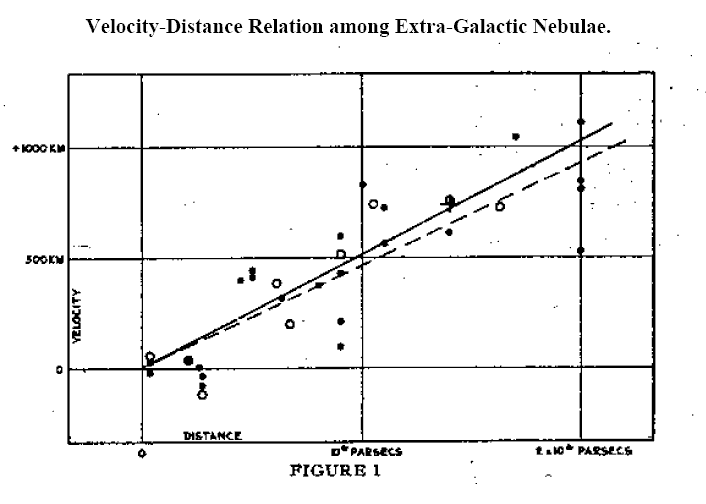
In 1929, Hubble made another remarkable discovery. He obtained the spectra of many galaxies and calculated the relative velocities of the galaxies from the Doppler shifts of spectral lines. All of the galaxies except for a few of the closest displayed redshifts, and thus are receding from us.

What was more, the relationship between the distance and the velocity was a simple linear one. The picture below shows Hubble’s original graph. The points all lie close to a straight line. In other words, the velocity of a galaxy (v) is proportional to its distance (d):

v=Hd

This equation later became known as Hubble’s Law. The constant of proportionality H is known as the Hubble constant.

But these observations did not explain the reason for the recession of the galaxies. Why should galaxies move away from each other? The answer was to come from Einstein’s theory itself.

When we solve Einstein’s field equations, we obtain a mathematical quantity called a metric. The metric may be thought of as a description of spacetime under certain conditions, in the presence of matter and energy.

In 1927, two years before Hubble’s discovery, a Belgian priest and physicist named Georges Lemaître predicted the redshift-distance relation using Einstein’s equations for General Relativity applied to a homogeneous and isotropic universe. The problem was explored further in the 1930s by the mathematicians Howard P. Robertson in the US and Arthur Geoffrey Walker in the UK.

The combined work of these scientists proved that the only metric which can exist in a homogeneous and isotropic universe containing matter and energy – in other words, a universe very much like our own – is the metric for an expanding or contracting universe.

You will notice how the results leading to the exact solutions of Einstein’s equations for such a universe required the combined effort of many scientists. In fact, such solutions are known as the Friedmann-Lemaître-Robertson-Walker metric, or FLRW metric.

We now had an explanation for the observed redshifts of the galaxies. It is caused by the expansion of the universe itself, and the expansion rate is given by the Hubble parameter. The value of this parameter gives us vital information about the evolution of the universe. It is one of the most important quantities in modern cosmology.

In the face of such overwhelming evidence for a dynamical, expanding universe, Einstein dropped his support for the cosmological constant, calling it “the biggest blunder” of his life.

The story does not end here. Astronomers kept observing the universe, measuring the distances and velocities of various objects such as galaxies, galaxy clusters and supernovae, and developing new and improved instruments and methods to measure the Hubble constant. More than seventy years after Edwin Hubble, we made new discoveries which show that Einstein did not make a blunder, and he may have been right about the cosmological constant after all, but for a different reason.

A late 17th century treatise on fencing and horsemanship

Here is a work in progress. It’s a transcription of Alimento di Sangue Illustre, a late 17th century Neapolitan treatise on fencing and horsemanship by Francesco Giovanni Angelo di Nuzzo.

Caspar van Wittel, View of the Royal Palace in Naples, 1706.
Prince Lorenzo Onofrio Colonna, Viceroy of Naples from 1687.
Portrait by Jacob Ferdinand Voet (1639-1689)

MontePython on CC-in2p3

The documentation on the IN2P3 Computing Centre portal does not contain any information specific to MontePython. Boris Bolliet provides some very useful instructions on his website. Aside from this, there is nothing at all. So I thought I would provide a few tips, especially for Euclid consortium members. 

If you are a member, you can request an account on the cluster. 

The first thing to do is to create a folder on /sps/euclid/Users/. You may choose any name (e.g. your username:  /sps/euclid/Users/username).

In order to use MontePython, you will need to install software packages. Just follow the instructions on Boris Bolliet’s page.

The tricky bit is the job submission script. I am grateful for Quentin Le Boulc’h for what follows. We spent a lot of time trying to pin down the right parameters for the resource options.

You have two options.

Option 1

#!/bin/sh
#$ -N yourscript
#$ -P P_euclid
#$ -q pa_long
#$ -l sps=1
#$ -j n
#$ -l os=cl7 -pe openmpi 4
#$ -o $JOB_ID.out
#$ -e $JOB_ID.err

export OMP_NUM_THREADS=1

source /pbs/home/y/yourusename.profile
source /usr/local/shared/bin/openmpi_env.sh

mpirun -np $NSLOTS montepython/montepython/MontePython.py run  etc. 

Option 2:

#!/bin/sh
#$ -N yourscript
#$ -P P_euclid
#$ -q pa_long
#$ -l sps=1
#$ -j n
#$ -l os=cl7 -pe openmpi_8 32
#$ -o $JOB_ID.out
#$ -e $JOB_ID.err

export OMP_NUM_THREADS=8

source /pbs/home/y/yourusename.profile
source /usr/local/shared/bin/openmpi_env.sh

mpirun -np 4 -pernode montepython/montepython/MontePython.py run  etc. 

The APC cluster (1): SSH without a password

Why would you need to avoid entering a password when you use SSH? Typing in your password each time you log in is tedious. You may also need to call ssh from within a shell script.

These instructions are not specific to the APC computing cluster (APCSSH and APCCLM) .  They will work on any Unix-like operating system.

You already have an APC account with a login name, which I shall call APClogin. I assume you have already succesfully logged into your APC account using your password. Write down your password somewhere, case you need it.

If you are using Mac OS X, you can do all of the steps below in Terminal. If you are using Windows, you need an ssh client such as PuTTY .

LocalLogin stands for the login name on your local machine.

Here’s how to do it.

1: Generate the authentication keys

Type the following in your terminal window.

$ ssh-keygen -t rsa

You will get a message saying:

Generating public/private rsa key pair.
Enter file in which to save the key (/Users/LocalLogin/.ssh/id_rsa):

If you wish to change the default location, go ahead and specify a file path. Better to keep it simple, and just press Enter.
You will get this message asking for a password (“passphrase”). Do not enter one. Just press Enter, twice.

Enter passphrase (empty for no passphrase):
Enter same passphrase again:

If you did everything properly you will get a message giving the file path to the keys, and the key fingerprint:

Your identification has been saved in /Users/LocalLogin/.ssh/id_rsa.
Your public key has been saved in /Users/LocalLogin/.ssh/id_rsa.pub.
The key fingerprint is:
SHA256:dWitjNhmrttyt7oCFmYdsu6wdA6Y5yao8UuoZ7Zzgnjsi22Q LocalLogin@apcdhcp24.in2p3.fr
The key's randomart image is:
+---[RSA 2048]----+
| |
| . |
| . . O .|
| . o o O + |
| S o B * =|
| ... . + o = = |
| Ho. . o = . .|
|o=+O.o .. o + o |
|o=O+*. ..+ .|
+----[SHA256]-----+

2: Create a .ssh directory on apcssh

Next, you need to create a .ssh directory on apcssh.in2p3.fr by typing:

$ ssh APClogin@apcssh.in2p3.fr mkdir -p .ssh

You will be asked for your password (that is why you need to have it written down somewhere). Type it in.

APClogin@apcssh.in2p3.fr's password:


3. Append your local public key to the authorised keys on apcssh

Enter the line below. You will then be asked for your password, which you need to enter.
$ cat .ssh/id_rsa.pub | ssh APClogin@apcssh.in2p3.fr 'cat >> .ssh/authorized_keys'
APClogin@apcssh.in2p3.fr's password:

4. Done

Now you should be able to log into apccsh.in2p3.fr using the usual ssh command without entering a password.

Doing the same for the APC cluster

If the above works, you can log into apcclm following the same steps, except that you need to log into apccssh first.

In summary:

1. Log into apccsh (which you can now do without a password)

2. Generate the authentication keys

3. Create a .ssh directory on apcclm by typing

$ ssh APClogin@apcclm mkdir -p .ssh

4. And you’re done

The APC cluster (3): Montepython with Euclid likelihoods

The latest public release of Montepython includes Euclid likelihoods for the redshift survey (euclid_pk) and the cosmic shear survey (euclid_lensing).

The __init__.py  file needs to be edited because of Python syntax issues. If you try to use it as provided, you will get two errors messages.

File "/home/[APClogin]/montepython/montepython/likelihoods/euclid_pk/__init__.py", line 224, in loglkl
k_sigma = np.zeros(2.*self.nbin+1, 'float64')
TypeError: 'float' object cannot be interpreted as an index

The problem here is the decimal point after the 2, which makes it a float, when it is being used to create an index, which must be an integer.

Correction:
k_sigma = np.zeros(2*self.nbin+1, 'float64')

The second error is caused once again by an unnecessary decimal point in the index:
File "/home/[APClogin]/montepython/montepython/likelihoods/euclid_pk/__init__.py", line 330, in integrand
return self.k_fid[:]**2/(2.*pi)**2*((self.tilde_P_th[:,index_z,index_mu] - self.tilde_P_fid[:,index_z,index_mu])**2/((2./self.V_survey[index_z])*(self.tilde_P_th[:,index_z,index_mu] + self.P_shot[index_z])**2 + (self.alpha[:,2.*index_z+1,index_mu]*self.tilde_P_th[:,index_z,index_mu])**2
*self.k_fid[:]**3/2./pi**2
*self.nbin*log(self.kmax/self.kmin)))
IndexError: only integers, slices (`:`), ellipsis (`...`), numpy.newaxis (`None`) and integer or boolean arrays are valid indice

Correction:
return self.k_fid[:]**2/(2.*pi)**2*((self.tilde_P_th[:,index_z,index_mu] - self.tilde_P_fid[:,index_z,index_mu])**2/((2/self.V_survey[index_z])*
(self.tilde_P_th[:,index_z,index_mu] + self.P_shot[index_z])**2 + (self.alpha[:,2*index_z+1,index_mu]*self.tilde_P_th[:,index_z,index_mu])**2
*self.k_fid[:]**3/2./pi**2*
self.nbin*log(self.kmax/self.kmin)))

The APC cluster (2): Using Montepython

The official documentation is here http://monte-python.readthedocs.io/en/latest but it glosses over some important details. You may find more information here: http://www.iac.es/congreso/cosmo2017/media/montepython.pdf

Installing Montepython

Installing Montepython is quite straightforward if you follow the installation guide. Just make sure that that your version of Python is 2.7. There are some syntax changes in Python 3 which prevent the code from installing.

Running Montepython

Running Montepython on your local machine is easy if you follow the official documentation. For the code to be any use, however, you need to output chains with thousands of points. And that means running it on the APC cluster.

Here are some helpful tips.

The graphical backend

Montepython and the CLASS Python wrapper use Matplotlib. You need to log in with  the -Y option for both apcssh and apcclm:
$ ssh -Y APClogin@apcssh.in2p3.fr
followed by
$ ssh -Y apcclm

When you run Montepython on the cluster using a script, you will need to set this environment variable in the script itself (see below).

External programs within CLASS

If you modify CLASS by calling an external program (let’s call it PowerSpectrumExtension.py) to calculate some quantity, remember to make it executable by running
chmod +x PowerSpectrumExtension.py

Job submission

You need to write a script that gets the job done. This is described here https://www.apc.univ-paris7.fr/FACeWiki/pmwiki.php?n=Apc-cluster.Scheduler.

When you run jobs on a cluster, you are sharing resources with the other users. If you ask for resources (memory, number of nodes) that are unavailable, or ask for too much, your job will be sent to the back of the queue, or aborted.

Here’s an example of a message for an aborted run:
There are not enough slots available in the system to satisfy the 4 slots
that were requested by the application:
Montepython.py

Either request fewer slots for your application, or make more slots available
for use.

You also need to set the right environment variables for the required libraries

This is an example of a script which ran succesfully on the APC cluster:

#!/bin/bash
#PBS -N JOBNAME
#PBS -o $PBS_JOBID.out
#PBS -e $PBS_JOBID.err
#PBS -q furious
#PBS -m bea
#PBS -M name.surname@apc.univ-paris7.fr
#PBS -l nodes=1:ppn=32,mem=64GB,walltime=200:00:00
export SCRATCH="/scratch/$USER.$PBS_JOBID"
export PATH=/usr/local/openmpi/bin:$PATH
export OMP_NUM_THREADS=8
export LD_LIBRARY_PATH=/usr/local/openmpi/lib/:/usr/local/openmpi/lib/openmpi/:$LD_LIBRARY_PATH
set -e
cd ~/montepython
/usr/local/openmpi/bin/mpirun -np 4 env MPLBACKEND=Agg montepython/Montepython.py run -p input/lcdm.param -o chains/planck/lcdm -N 20000 --silent

The –silent command suppresses Montepython’s screen output (which you don’t need when you submit a cluster job).

Here are some good resources explaingin qsub settings:

 https://hpcc.usc.edu/support/documentation/running-a-job-on-the-hpcc-cluster-using-pbs

http://www.arc.ox.ac.uk/content/pbs

Analysing the chains

Once the run has terminated, output the plots and information by running:

cd montepython
env MPLBACKEND=Agg montepython/Montepython.py info [path]/[to]/[chains]/*.txt --want-covmat

The option –want-covmat outputs the covariance matrix.

Make sure to include env MPLBACKEND=AGG or you will get the usual matplotlib display problems.

« Older posts

© 2025 Ivan Debono

Theme by Anders NorénUp ↑